Most Popular Frequently Asked Questions
- Go to the Login page and click Forgot password under the login fields.
- Follow the instructions on the screen.
- You will receive an email with the next steps. If it does not arrive, check your spam folder. If you still cannot access your account, email support@idrawpro.com or call (844) 437-2977.
How?
1. Submit your inquiry
- Sign Up, or,
- email support@idrawpro.com,
- Call toll free (877) 764 9336
2. Get a free quote.
- Approve the price
- Let us do the work.
- Experinced team will take care of your order.
3. Pay for completed work.
Pay safely using our secure payment system with mutliple options to choose.
Get A Free Quote
We support a wide range of projects, big or small, one-off or repeat. From commercial and institutional buildings to residential work, IDRAWPRO provides shop drawings and drafting support across trades.
Most ordered services:
- Shop drawings
- Drafting/CAD
- Quantity takeoffs
To add coworkers to your company's account please follow the steps below:
- After login go to your company's profile by clicking on the company name in the left menu.
- Enter a coworker email address in the input field on the top right and click the Invite Coworker button.
- A coworker will receive an invitation email with steps to follow.
- After signup, the coworker's name will be listed in the company's profile page.
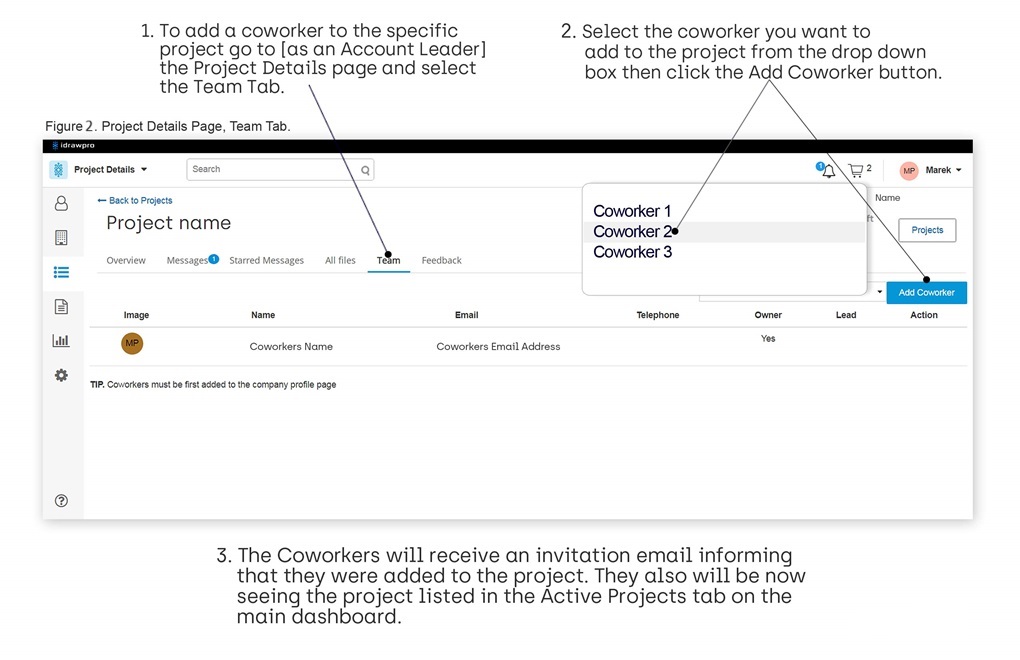
- To add coworkers to the specific project go to the project details page, then to the Team tab, select coworker name from the drop down list and click the Add Coworker button.
Figure 1 . Adding coworkers to the account
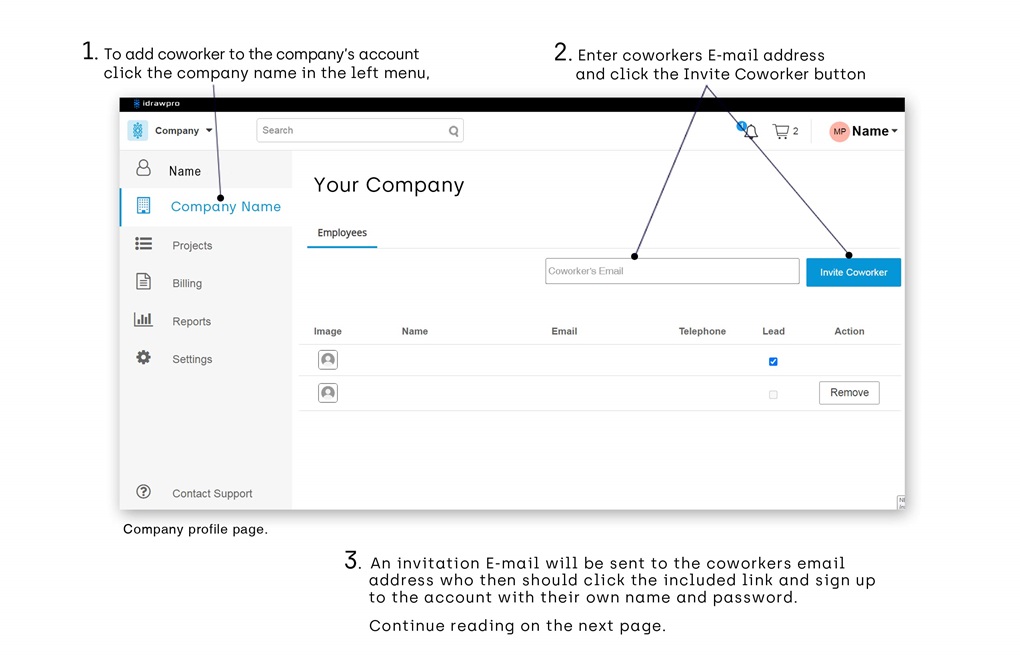
Figure 2. Adding coworkers to the specific project.
Placing an order is quick easy and always free with few convenient ways to submit your order:
- Signup to our online platform or,
- Email your inquiry to support@idrawpro.com,
- Call toll free (844) 437 2977
Pay with confidence when your order is complete!
Basic Account for new and one time customers
- For new customers a deposit payment can be a best practice to earn trust before continuing on with the project.
- We accept payments made with major credit cards, PayPal, bank transfers and checks.
- All Credit Card charges are pending your order completion meaning that you will not be charged until your order is complete and approved.
Plus Account for returning customers
Make payemnt with Net 30 Terms with check, bank transfer or credit card.
We accept VISA, Mastercard, American Express, PayPal, Check, Bank Transfer. Payment by check may require confirmation of check clearance prior to release of full work for new customers.
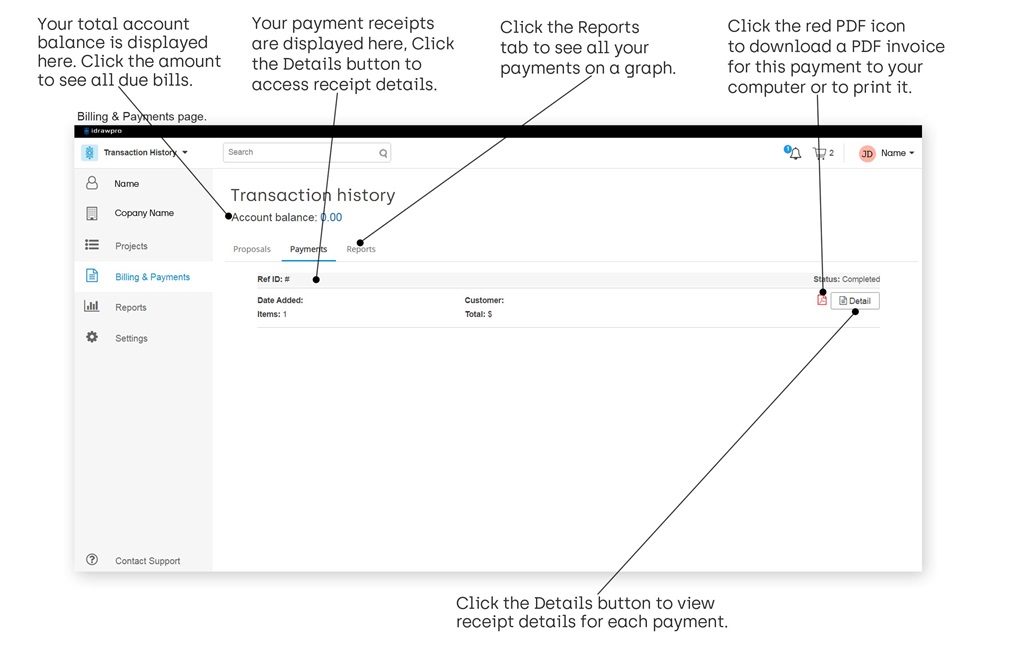
To view and download invoices for your payments please click on the Billing link located in the left menu and click the red PDF symbol icon and the Invoice in the PDF format will be downloaded to your computer, see Figure 1 below.
Figure 1. Billing and Payments Page.
- Online or traditional billing and payments.
- State-of-the-art security, your information is secured with 2048-bit Extended Validated SSL encryption.
- All Credit Card transactions are processed directly by Stripe or PayPal (we do not store your financial information).
- All Credit Card charges are pending your order completion meaning that you will not be charged until your order is complete.